Google reviews for business sit next to your Business Profile in Maps and Search, and your star score is the average of every published rating on a scale of 1 to 5 stars. You can reply once your profile is verified, ask every customer for an honest review with no reward, report reviews that break policy, and fix most missing-review problems by matching the symptom to its cause.
Contents
How do Google reviews work for a business?
A review is a public star rating, often with a few lines of text, that a customer leaves after a real visit or job. Reviews and other user contributions to Google Maps must reflect a genuine experience, and they show next to your Business Profile in Maps and Search.
Three conditions decide who can take part. Customers must be signed into a Google Account to leave a review, and they can create that account with a non-Gmail email address. As the owner, you can reply only after your business is verified. Reviews are also available only in certain countries or regions and for certain business categories, and that availability may change over time.
How is your Google star rating calculated?
Your score is a plain average of all ratings published on Google for your business, on a scale where 5 stars is the highest. Reviews still waiting for a policy check, or removed for breaking policy, are not published, so they are not counted.
Search and Maps show three things about your reviews: the review score, top reviews and the total number of reviews. After someone leaves a new review, it may take up to 2 weeks before the updated score shows. So a fresh rating that has not moved your average yet is usually a timing question, not a lost review.
Not everything that looks like a review counts the same way:
| Kind | Counts toward your score? | What you can do |
|---|---|---|
| Standard Google review | Yes | Reply, or report a policy break |
| Service business review | Yes | Keep your service list current |
| Review from another site | Not stated by Google | Contact the original site |
| Customer photo update | No | Reply with extra details |
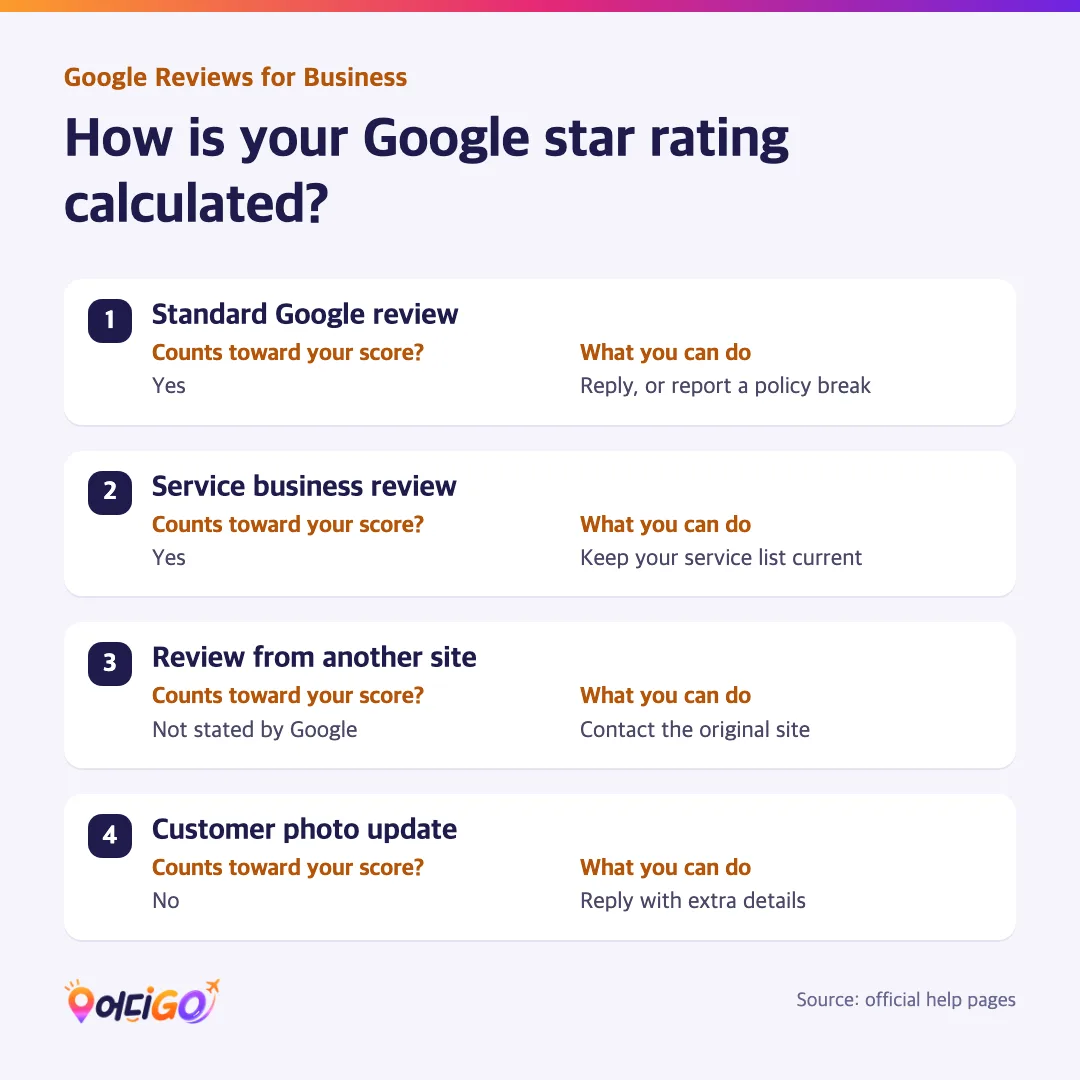
For service businesses, customers may be asked to choose the specific service provided, from your list of services or from common job types for similar businesses. Reviews from other local review sites are generated automatically from information Google gathers on the web, so concerns about them go to the site where they were written. Photo updates from customers do not affect your review score, but other customers can see them.
Do Google reviews affect your local ranking?
Reviews help, but they are one input among several. Google says local results are mainly based on relevance, distance, and popularity, and that more reviews and positive ratings can help your local ranking.
Prominence means how well-known a business is, and it draws on things like how many websites link to your business and how many reviews you have. Distance depends on where the searcher is, so no number of reviews will make a shop across town look closer.
Replying shows customers that you value their feedback, and positive reviews with helpful replies can help your business stand out. There's no way to request or pay for a better local ranking on Google. Treat any promise of a guaranteed ranking jump from bought reviews or reply services as a sales pitch.
Which review situation are you in, and what comes first?
Most owners arrive with one specific problem rather than a general question. Find your situation below; the table is our own summary of the Google help pages and the Maps policy, and the last column points to the section with the details.
| Your situation | First move | Avoid | Details |
|---|---|---|---|
| New profile, no reviews yet | Verify, then share your review link | Reviews from friends or family | Getting reviews |
| First harsh review | Short, calm, factual reply | Reporting it only because you disagree | Replying |
| Review names a staff member | Reply without personal details | Asking staff to collect named reviews | Real examples |
| Customer says they posted, nothing shows | Wait a few days, then check the symptom table | Asking them to post the same text again | Missing reviews |
| Several reviews vanished together | Look back at your recent review requests | A fast push to replace them | Missing reviews |
| Every review is gone | Check email for a suspension or restriction | Opening a second profile | All reviews gone |
| Moved, renamed or new owner | Keep and edit the same profile | Starting a fresh listing | Move, rename, close |
| Wave of 1-star reviews plus a money demand | Collect evidence, use the extortion form | Paying or bargaining | Fake reviews |
Two habits sit behind most of these rows: never create a new profile to escape a problem, and never try to replace lost reviews with a sudden burst. Google's policy treats unusual volumes or patterns of review contributions as a sign of rating manipulation. Google also says not to create a new Business Profile because of a change in physical location or ownership.
What can a business owner control, and what not?
Much of the frustration with Google reviews comes from expecting controls that owners do not have. This table lists what the help pages let you do and marks the gaps where they are silent; what you may ask customers is covered in the next section.
| Action | Allowed? | Basis |
|---|---|---|
| Reply to reviews | Yes, after verification | Manage customer reviews |
| Edit or delete your own reply | Yes | Edit or Delete under the reply |
| Share a link to a good review | Yes | Review link from Google Maps |
| Ask every customer for a review | Yes | No reward, no steering |
| Delete a customer review yourself | No owner tool described | Report it instead |
| Turn reviews off | No owner setting described | Google may pause them |
| Restore a policy-removed review | No | Removals are final |
Where a row says no owner tool or setting, the route is a report to Google, covered in the section on fake or unfair reviews.
Is this review request allowed? Real examples checked
The policy is written in general terms, so here is how it applies to requests owners actually make. Each verdict follows the Maps policy and the review request page; the example wording is ours.
| Request | Verdict | Policy point |
|---|---|---|
| QR sign at the counter for every customer | Allowed | Genuine experience, no reward |
| Same review link on every receipt | Allowed | Even request to everyone |
| "If you loved it, leave us five stars" | Not allowed | Influencing the rating |
| "Please mention [staff name] in your review" | Not allowed | Content naming a staff member |
| Tablet handed over at the till to review now | Not allowed | Pressure on the premises |
| Link sent only after a high survey score | Not allowed | Selective solicitation |
| Free coffee for any review, good or bad | Not allowed | Incentive of any kind |
| Refund if the negative review comes down | Not allowed | Incentive to remove a review |
| Relatives or staff posting reviews | Not allowed | Conflict of interest |
| Inviting an unhappy reviewer to call you | Allowed | Resolving the issue privately |
The survey row catches well-meaning owners, because sending the link only to happy customers can feel like ordinary customer care. The Maps policy does not allow merchants to discourage or prohibit negative reviews, or selectively solicit positive reviews from customers. Merchants also should not pressure customers to leave ratings while they are still on the premises, or ask for specific content to be included.
The free coffee row matters because the reward does not need to depend on the rating. Offering incentives, like free or discounted goods or services, to customers in exchange for reviews is considered fake engagement and is strictly prohibited. That includes rewards for changing reviews or removing negative ones.
Can a review practice be legal but still break Google rules?
Yes, and the gap matters if you follow consumer law closely. In the United States, the Federal Trade Commission's rule on consumer reviews and testimonials went into effect on October 21, 2024, and it lets courts impose civil penalties for knowing violations.
The two rulebooks overlap but are not the same. This comparison uses the FTC's own questions-and-answers page and Google's Maps policy; it is a summary, not legal advice.
| Practice | FTC rule (US) | Google Maps policy |
|---|---|---|
| Reward for any review, no rating required | Not banned by the rule | Prohibited |
| Reward tied to a positive review | Banned | Prohibited |
| Reviews written by employees | Allowed with clear disclosure | Conflict of interest |
| Paying a customer to remove a negative review | Not in the rule, may breach the FTC Act | Prohibited |
| False accusation against a reviewer | Banned | Personal attacks not allowed |
| Contacting an unhappy reviewer to fix the issue | Not prohibited | Recommended |
The FTC says its rule does not prohibit giving incentives for reviews, as long as there is no express or implied requirement that the reviews express a particular sentiment. Google is stricter: merchants may not offer incentives such as payment, discounts, free goods or services in exchange for posting any review. Legal under consumer law is therefore not the same as safe on your profile, and the stricter rule decides whether your reviews stay up.
The FTC also says you can respond publicly to a negative review, but its rule prohibits a false accusation about the reviewer made knowingly or with reckless disregard for the truth. Your response also should not use physical threats or intimidation to get the review removed or changed. Outside the US, check the rules of your own consumer protection authority, and treat Google's policy as the minimum for your profile.
How do you get more Google reviews without breaking the rules?
The simplest method is the one Google built for it: a review link or QR code from your own profile. Go to your Business Profile, select Read Reviews, then Get more reviews, and select Copy to take the link.
Review QR codes can currently be generated only on a computer browser, not on mobile devices. Google suggests putting the link on receipts, in thank-you emails and at the end of a chat, and printing the QR code for your store. You can also send review requests by email, WhatsApp message or Facebook post.
Ask every customer the same way and at the same moment, such as on the receipt or in the follow-up email, so nobody is picked by how pleased they looked. Our Google review link guide covers copying the link on each device and placing it where customers will see it.
How do you reply to Google reviews?
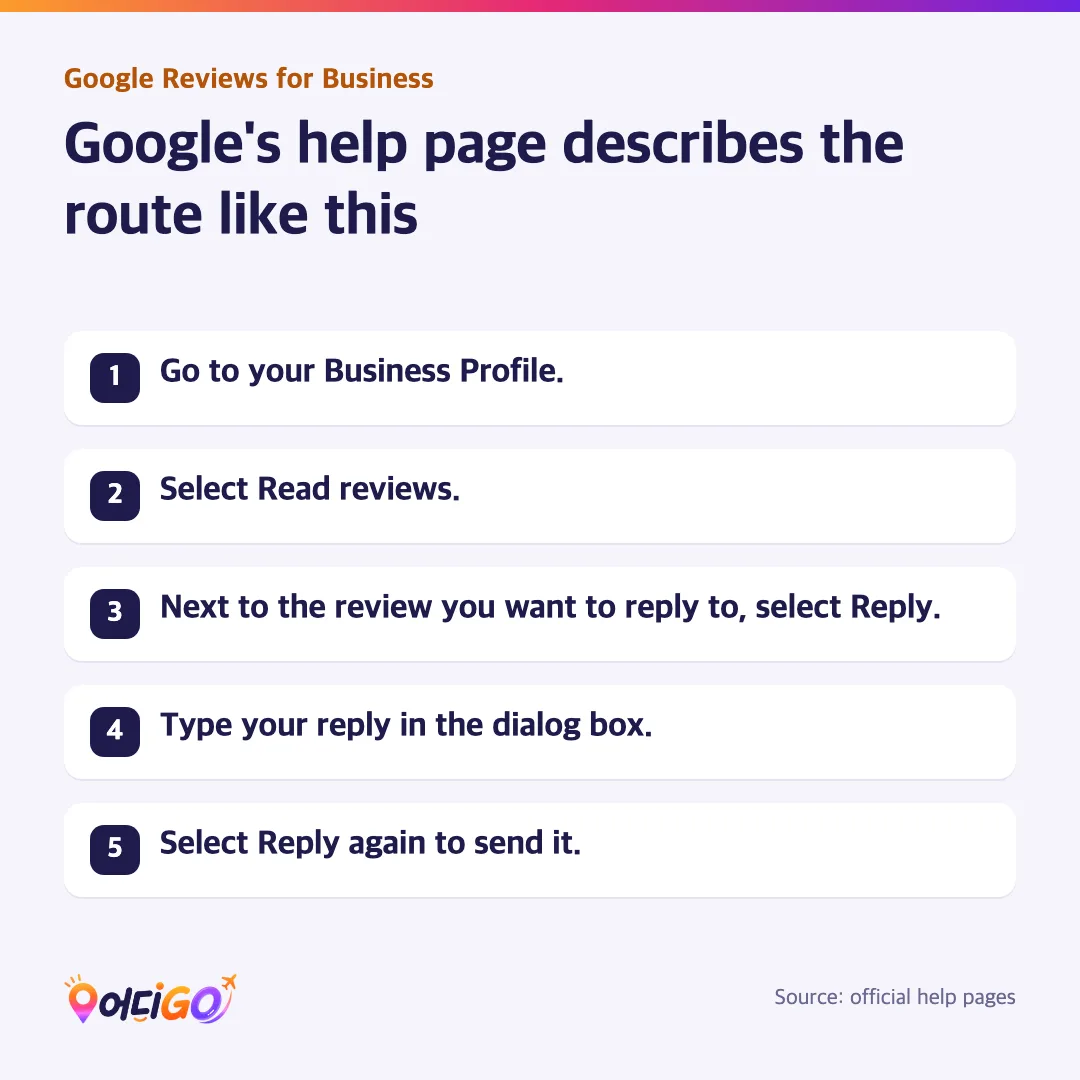
Replying takes a minute once your profile is verified. Google's help page describes the route like this:
- Go to your Business Profile.
- Select Read reviews.
- Next to the review you want to reply to, select Reply.
- Type your reply in the dialog box.
- Select Reply again to send it.
Want one more place where customers can find your shop? → List your shop for free
On a phone, open the Google Maps app, tap Business at the bottom right, then tap Reviews.
What happens next is worth knowing, because owners often think a reply has vanished:
| Stage | What happens |
|---|---|
| Checked | Policy review before posting |
| Not approved | You are asked to edit |
| Posted | Shown as your business, no personal name |
| Customer notified | Reviewer can still edit; date updates |
Replies usually take up to 10 minutes to review, but sometimes the check can take up to 30 days. If the reply isn't approved, you are asked to edit it. An approved reply appears under the review as your business, and your personal name is not shown.
To change a reply, open Read reviews again, select Edit under your reply, make the change and select Update. The same spot has Delete if you want the reply gone entirely.
A great review can also be shared as a testimonial. In Google Maps, search for your business name and city, open Reviews, select More next to the review, then Share review, Send a link and COPY LINK.
How should you word replies to good and bad reviews?
Your replies are public, so they are written as much for the next customer as for the reviewer. Keep them short, polite and specific, and skip the copy-and-paste thank-you on every review.
Google's tips come down to a handful of habits:
- Answer reviews where you can add something, such as an update or an answer to a question.
- Stay conversational, not promotional; don't use a reply to offer deals.
- Never share a reviewer's private details or attack them personally.
- Admit mistakes, explain what is outside your control and apologise when it fits.
- Use the reviewer's name, mention their specific point and reply promptly.
Negative reviews are not necessarily a sign of poor business practices, and a constructive reply with follow-up may even encourage the customer to update their review. When a case is complicated, invite the person to contact you by phone or email and settle the detail privately.
The sample replies below are our own wording, written to follow those tips. Swap the brackets for real details.
Positive review that mentions a detail: "Thanks, [Name]. Glad the [dish or service] worked out, and we've passed your note on to the team. See you next time. [Your first name], [Business name]"
Positive review that asks a question: "Thank you, [Name]. To answer your question, [short factual answer]. We hope that helps for your next visit. [Your first name]"
Complaint about a real mistake: "[Name], you're right that [specific problem] wasn't good enough, and I'm sorry. We've since [change you made]. If you'd like to talk it through, please contact us by phone or email. [Your first name], [Business name]"
Complaint about something outside your control: "Thanks for the feedback, [Name]. [Brief, factual explanation of the limit]. Here's what we do in that situation: [what you can do]. [Your first name]"
None of these replies offers a discount or asks the customer to change their rating, since either would turn a good reply into a policy problem.
What should you do about fake or unfair reviews?
Start by separating unfair from fake. Google tells owners not to report a review just because they disagree with it or dislike it, and it doesn't get involved in conflict between businesses and customers.
For a review that does break policy, such as spam, off-topic text or a review from someone who never visited, select Report next to it under Read reviews. Review evaluation typically takes several days, and you can follow the status in the Reviews Management Tool. If a flagged review is judged not to break policy and you disagree, you can submit a one-time appeal and select up to 10 reviews.
If a sudden wave of 1-star and 2-star reviews arrives with a demand for money to remove them, do not engage with or pay the people behind it. Keep screenshots that show the date, time and sender, and report it through the separate merchant extortion form. Our guide to remove fake Google reviews walks through report statuses, the appeal and the evidence that form asks for.
Why are my Google reviews not showing up?
Start from what you see, not from a list of causes. There are several reasons why reviews might be missing from your profile, and usually reviews are removed for policy violations like spam or inappropriate content.
| What you see | Likely cause | What to do |
|---|---|---|
| Customer posted, review not there yet | Still in the policy check | Wait a few days |
| Review appeared, then vanished | Spam filter or policy removal | Contact support only if genuine |
| New review shows, score unchanged | Score update lag | Check the average later |
| Customer cannot post at all | Old app, or not signed in | Update Maps and sign in |
| Reviews missing after a merge | Both profiles still syncing | Wait a few days |
| Reviews missing after reinstatement | Removed during reinstatement | Contact support |
| No new reviews since closing | Profile marked permanently closed | Check your business status |
| Every review gone | Suspension, restriction or pause | See the next section |
Reviews are checked to ensure they comply with Google's policies, and this can take a few days. If you recently merged Business Profiles, it might take a few days for reviews from both profiles to display on Search and Maps. Customers who use older phones or software might have trouble leaving reviews, so suggest they update the Maps app.
Reviews removed for policy violations won't be restored. Google's automated spam detection may occasionally remove a legitimate review by mistake, and the help page says to contact support when that happens. Reviews can also be removed after a Business Profile is reinstated, and that case goes to support as well. Include the review link from the sharing steps above, so support can find the exact review.
Google's page on missing reviews does not connect removals to what the business itself did. The Maps policy does, and these habits are the usual link when several reviews disappear together:
| If you have been doing this | Why reviews get removed | Do this instead |
|---|---|---|
| Asking staff, friends or relatives | Conflict of interest | Ask real customers only |
| A discount or freebie for reviewing | Incentivized review | Ask with no reward |
| A big review drive in a short window | Unusual volume or pattern | Ask visit by visit |
| Customers adding your phone or website | Contact details not allowed in reviews | Ask about their experience only |
| One customer posting the same text twice | Repetitive content | One review per customer |
Content based on a conflict of interest is removed, and the Maps policy says that conflict may include current or former employment or family relationships. The policy also bars reviewers from posting email addresses, phone numbers, social media links or links to other websites in their reviews. It prohibits posting the same content multiple times, either from the same account or from multiple accounts. Reviews posted because a business offered payment, discounts or free goods are removed as rating manipulation.
What if all your Google reviews disappeared at once?
When every review goes missing together, look at the profile rather than the reviews. Check these four possibilities in order.
The profile was suspended or disabled. Google may suspend or disable Business Profiles that don't follow its guidelines. You can appeal in the Business Profile appeals tool, and optional evidence such as an official business registration, a business license, tax certificates or utility bills can strengthen it. Appeals can only be submitted once, so attach everything before you send it. Don't create a new Business Profile for the same business.
Google restricted the profile for fake engagement. Restrictions can include blocking new reviews or unpublishing existing ones for a set period of time, or showing a warning that fake reviews were removed. Google notifies owners by email before applying a restriction, and businesses can appeal.
Google paused posting for a while. Posting may be turned off for a short time to protect a place from a spike in irrelevant or offensive content, and Google lifts the restriction once that risk subsides.
Your category does not allow reviews. Reviews and ratings are removed and disabled for profiles primarily categorized as educational institutions for students aged 6 to 18. Universities, day care centers and swim schools are not affected, and if the category doesn't describe your business, you can change it.
What happens to reviews when you move, rename or close?
Reviews belong to one Business Profile, so changes to the business can move them, keep them or stop new ones. Here is what Google says for each case.
| Change | What happens to reviews | Your move |
|---|---|---|
| New address, same name | Usually moved automatically | Update the address on the same profile |
| Second profile created by mistake | Can be transferred | Contact Google |
| New owner or manager, same name | They remain | Reply to old reviews |
| Minor name change | They remain | Edit the name |
| Bigger name change | Treated as a new business | Plan for a fresh start |
| Temporarily closed | They remain, new ones allowed | Mark the closure |
| Permanently closed | They remain, no new ones | Nothing further |
If you move to a new address and keep the same business name, Google will transfer your reviews automatically, but for categories like hotels, golf courses or scenic attractions they might not be moved. If a business has a new owner or manager but keeps the same name, the reviews remain, and you can reply to old reviews to explain any changes. Customers can leave new reviews for temporarily closed businesses but not for permanently closed ones.
What does a weekly Google review routine look like?
Reviews are easier to handle in one short weekly slot than in scattered panics. The routine below is our suggestion, not a Google requirement.
| Task | What to check |
|---|---|
| Read new reviews | Questions, problems, staff mentions |
| Reply | Questions and complaints first |
| Flag | Clear policy breaks only |
| Track reports | Status in the Reviews Management Tool |
| Check request spots | Receipts, emails and counter sign carry the right link |
| Look for gaps | Customers who posted but see nothing |
If you run several locations, repeat the check for each profile, since each has its own reviews and its own link.
Frequently asked questions
Can I turn off Google reviews for my business?
The help pages don't describe any setting that lets an owner switch reviews off. What they do say is that Google might temporarily disable user-created content, including reviews, for certain Business Profiles or business categories.
Do reviews only show on a verified profile?
Verification is required before you can reply, and some guides also blame it for missing reviews. Google's page on missing or delayed reviews does not list an unverified profile as a cause, so work through the symptom table first.
Can a customer change their review after I reply?
Yes. They are notified of your reply and can still change their review, and the date on it then updates to the latest edit.
Can I ask a customer to update an old negative review?
The FTC says its rule does not prohibit contacting customers who post negative reviews to resolve the reported issues. Fix the problem first, mention what changed, and leave the decision to them.
Are a few negative reviews bad for my business?
Not necessarily. A mix of positive and negative feedback often feels more trustworthy to people deciding where to go.
References
This guide is based on the following official pages.
- Google Business Profile Help — Manage customer reviews
- Google Business Profile Help — Tips to get more reviews
- Google Business Profile Help — Understand review scores for local places and businesses
- Google Business Profile Help — Tips to improve your local ranking on Google
- Google Business Profile Help — Create a Google link or QR code to request reviews
- Maps User Generated Content Policy — Prohibited and restricted content
- Google Business Profile Help — Report inappropriate reviews on your Business Profile
- Google Business Profile Help — About missing or delayed reviews
- Google Business Profile Help — Business Profile restrictions for policy violations
- Google Business Profile Help — Report negative review extortion scams
- Google Business Profile Help — Move your reviews across Business Profiles
- Google Business Profile Help — Fix suspended or disabled profiles
- Maps User Generated Content Policy — Posting restrictions
- Federal Trade Commission — The Consumer Reviews and Testimonials Rule: Questions and Answers
Last checked: 2026-10-27
Related guides
Next step: Google Review Link: How to Get Yours and Share It Safely
This guide was drafted with AI, checked sentence by sentence against the official source pages by a separate AI fact-checker, and approved for publication by the Eodigo Marketing Team. Our editorial standards
Reviews build trust; make sure more customers have a place to see it.
This blog is brought to you by Eodigo. For restaurants, cafés, salons and other local shops, we build multilingual websites, run ads that bring in customers, and connect orders and bookings in one place. Listing your shop on Eodigo is free and helps more customers find you.